


Logic board replacement workflow for faulty circuit system
When your device suddenly stops working, shows no display, or behaves unpredictably, the issue often lies deeper than software—it could be the logic board. The logic board acts as the brain of your device, connecting and controlling all major components. Understanding the Logic board replacement workflow is essential, whether you're a technician, a business owner, or a user exploring MacBook repair services.
In this guide, we’ll walk through a structured and practical approach to diagnosing and replacing faulty circuit systems. You'll also learn how professional MacBook repair processes work and when to seek expert help.
What is a Logic Board and Why It Fails?
The logic board (also known as the motherboard) is the central hub of your device. It connects the CPU, RAM, storage, and other essential components.
Common Causes of Logic Board Failure
Power surges or voltage fluctuations
Liquid damage
Overheating due to poor ventilation
Manufacturing defects
Physical damage or drops
When these issues occur, simple fixes won’t work—this is where logic board replacement becomes necessary.
Signs You Need Logic Board Replacement
Recognizing early symptoms can save time and prevent further damage.
Key Warning Signs
Device not powering on
Random shutdowns or restarts
No display or distorted visuals
Burning smell or overheating
Ports not functioning properly
If you notice these, it's time to consider professional MacBook repair services or follow a structured replacement workflow.

Tools Required for Logic Board Replacement
Before starting, ensure you have the right tools. Using improper tools can damage sensitive components.
Essential Tools
Precision screwdriver set
Anti-static wrist strap
Plastic pry tools
Thermal paste
Cleaning solution (isopropyl alcohol)
Replacement logic board
For MacBook repair, specialized tools may be required due to compact design and proprietary screws.
Logic Board Replacement Workflow
This section outlines the step-by-step workflow followed in professional repair environments.
1. Initial Diagnosis
Before replacing anything, confirm the issue.
Perform power checks
Test battery and charger
Inspect for visible damage
Run diagnostic tools
This step ensures that logic board replacement is actually needed.
2. Data Backup (If Possible)
If the system partially works:
Backup important data
Remove storage if needed
Use external recovery tools
Data safety is critical, especially in MacBook repair services.
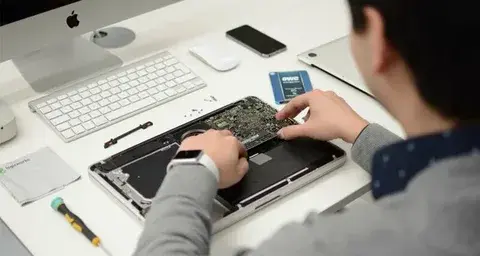
3. Device Disassembly
Carefully open the device.
Remove screws systematically
Disconnect battery first
Detach cables gently
Organize components properly
MacBooks require extra care due to tightly packed internal layouts.
4. Removing the Faulty Logic Board
Disconnect all connectors
Unscrew mounting points
Lift the board carefully
Inspect for corrosion or burn marks
This is a delicate step in the logic board replacement workflow.
5. Installing the New Logic Board
Align the replacement board properly
Secure screws without over-tightening
Reconnect all cables and components
Apply fresh thermal paste if required
Proper installation ensures long-term reliability in MacBook repair.
6. Reassembly
Reattach all internal parts
Secure outer casing
Double-check connections
Accuracy here prevents rework.
7. Testing and Quality Check
After reassembly:
Power on the device
Run performance tests
Check ports, display, and keyboard
Monitor temperature and stability
This final step confirms a successful logic board replacement.
DIY vs Professional MacBook Repair Services
While DIY repair may seem cost-effective, it carries risks.
DIY Repair Pros
Lower cost
Learning opportunity
DIY Repair Cons
Risk of further damage
Warranty void
Lack of specialized tools
Professional Repair Benefits
Certified technicians
Proper diagnostics
Warranty support
High success rate
For complex devices, choosing MacBook repair services is often the safer option.
Cost Factors in Logic Board Replacement
The cost of logic board replacement varies based on:
Device model
Availability of parts
Labor charges
Severity of damage
MacBooks typically have higher costs due to premium components and design complexity.
Preventing Future Logic Board Issues
Prevention is always better than repair.
Best Practices
Use surge protectors
Avoid liquid exposure
Keep vents clean
Monitor temperature
Use original chargers
These habits can extend the life of your device and reduce the need for MacBook repair.
FAQ Section (Schema-Style)
What is logic board replacement?
Logic board replacement is the process of removing a faulty motherboard and installing a new one to restore device functionality.
How long does MacBook repair take?
Most MacBook repair services complete logic board replacement within 1–3 days, depending on parts availability.
Can I replace a logic board myself?
Yes, but it requires technical skills, proper tools, and caution. Professional repair is recommended for MacBooks.
Is logic board replacement expensive?
It can be costly, especially for premium devices, but it’s often cheaper than buying a new laptop.
What causes logic board failure?
Common causes include overheating, liquid damage, electrical surges, and physical impact.
Conclusion
Understanding the Logic board replacement workflow helps you make informed decisions when dealing with faulty circuit systems. Whether you're handling repairs yourself or relying on MacBook repair services, following a structured approach ensures better outcomes.
If your device shows signs of motherboard failure, don’t delay. Seek professional MacBook repair support or consult a trusted technician to prevent further damage.
Comments