


Logic Board Replacement and Data Recovery Options
When a Mac suddenly stops turning on, freezes during startup, or shows signs of severe hardware failure, the logic board is often one of the first components technicians inspect. Since the logic board connects nearly every major part of your Mac, damage to it can affect everything from power delivery to storage access.
Many users worry that a failed logic board automatically means losing their files forever. Fortunately, that's not always the case. Depending on the type of damage, professional Logic board replacement and specialized data recovery techniques can often restore both your device and your important information.
In this guide, we'll explain how logic board failures occur, when replacement is necessary, available data recovery options, and how related services such as Trackpad repair and Ios installation help keep your Apple devices performing at their best.
What Is a Logic Board?
The logic board is the main circuit board inside your Mac. It connects and controls essential hardware components, including:
Processor (CPU)
Graphics processor (GPU)
RAM (on many modern Macs)
Storage controller
Charging system
USB and Thunderbolt ports
Display connections
Keyboard and trackpad communication
Because every major component relies on the logic board, even a minor fault can prevent the entire computer from functioning properly.
Common Causes of Logic Board Failure
Several factors can damage a logic board over time.
Liquid Damage
Water, coffee, or other liquids can create short circuits that permanently damage sensitive electronic components.
Power Surges
Using incompatible chargers or experiencing sudden voltage spikes may damage power management circuits.
Overheating
Dust buildup, blocked vents, or aging thermal paste can increase operating temperatures and reduce component lifespan.
Physical Damage
Dropping a Mac or applying excessive pressure may crack solder joints or damage internal circuits.
Component Wear
After years of use, power chips, capacitors, and controllers can eventually fail.
Signs You May Need Logic Board Replacement
Watch for these common symptoms:
Mac won't turn on
Random shutdowns
Continuous boot loops
No display despite power
USB or Thunderbolt ports not working
Charging issues
Frequent kernel panics
Burning smell or overheating
No response after replacing battery or charger
Professional diagnostics can determine whether repair is possible or a complete Logic board replacement is the better solution.
Is Logic Board Repair Better Than Replacement?
Not every damaged logic board requires complete replacement.
Repair may be possible if:
A single power chip has failed
Damaged capacitors can be replaced
Corrosion is limited
Broken solder joints can be repaired
Replacement becomes necessary when:
Multiple circuits are damaged
Severe liquid damage exists
Burnt layers inside the board cannot be repaired
The board has extensive physical damage
An experienced technician will evaluate the condition before recommending the most cost-effective solution.
Can You Recover Data from a Failed Logic Board?
Yes—in many situations, data recovery is still possible.
Whether recovery succeeds depends on:
Type of storage
Severity of board damage
Encryption settings
Storage chip condition
Modern Macs often use soldered SSD storage integrated into the logic board, making recovery more challenging but still possible with specialized equipment.
Data Recovery Options
1. Logic Board Repair for Temporary Access
Sometimes technicians repair only the damaged power circuits to make the Mac operational long enough to copy important files.
This is often the safest approach.
2. Chip-Level Recovery
Specialists may repair individual circuits without replacing the entire board, allowing access to stored data.
3. SSD Recovery
If the storage chips remain healthy, technicians may recover data using advanced board-level tools.
4. Backup Restoration
Users with:
Time Machine backups
iCloud Drive
External drive backups
can restore their files after the Logic board replacement is completed.
How Logic Board Replacement Is Performed
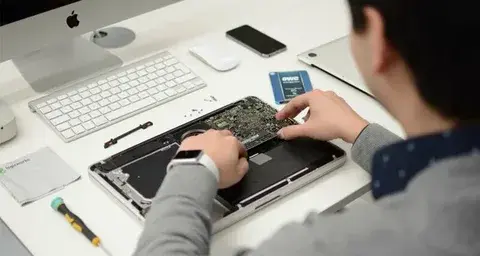
A professional replacement typically includes:
Complete hardware diagnostics
Inspection for liquid damage
Safe removal of the damaged board
Installation of a compatible replacement board
Thermal system servicing
Hardware testing
macOS verification
Performance testing
Quality repair centers also verify charging, ports, wireless connectivity, display, speakers, and keyboard functionality.
The Importance of Professional Diagnostics
Logic board problems often resemble issues caused by:
Battery failure
Faulty charger
Damaged display
SSD problems
RAM faults
Power button malfunction
Replacing the logic board without proper diagnosis can lead to unnecessary expenses.
Professional testing identifies the exact cause before repairs begin.
Trackpad Repair May Also Be Needed
While servicing your Mac, technicians often inspect other hardware components.
Trackpad repair becomes necessary if you notice:
Cursor jumping
Unresponsive clicks
Multi-touch gesture failure
Physical swelling beneath the trackpad
Pressure clicking inconsistently
Sometimes battery swelling underneath the trackpad causes both trackpad issues and additional internal stress that should be addressed immediately.
Repairing both problems together reduces future repair costs and minimizes downtime.
Why Ios Installation Matters
Many Apple users also own iPhones or iPads that occasionally require software restoration.
Professional Ios installation services help resolve:
Boot loops
Failed software updates
System crashes
Performance issues
Device freezing
Firmware corruption
Keeping your Apple ecosystem updated improves compatibility between your Mac, iPhone, iPad, and other Apple devices.
How to Protect Your Data
Preventive measures greatly reduce the risk of permanent data loss.
Consider these practices:
Enable Time Machine backups
Use iCloud Drive for important files
Maintain an external backup drive
Avoid using damaged chargers
Keep liquids away from your Mac
Clean cooling vents regularly
Shut down immediately after liquid exposure
Seek repairs promptly when problems appear
Regular backups remain the most effective protection against unexpected hardware failures.
Choosing the Right Repair Service
Before selecting a repair provider, ask whether they offer:
Board-level diagnostics
Genuine or high-quality replacement parts
Data recovery assistance
Repair warranty
Transparent pricing
Experienced Apple technicians
Post-repair testing
Backup recommendations
A thorough diagnostic process helps determine whether repair, replacement, or data recovery is the most suitable solution.
Final Thoughts
A failed logic board doesn't always mean your valuable files are gone forever. With professional diagnostics, many Macs can be repaired, restored, or recovered using advanced board-level techniques. When replacement is necessary, a proper Logic board replacement ensures stable performance and long-term reliability.
At the same time, related services such as Trackpad repair and Ios installation help maintain the overall health of your Apple devices, providing a smoother and more dependable user experience. Acting quickly when hardware issues first appear improves the chances of successful repair while protecting your important data for the future.
Comments