


Logic board repair methods for water damage restoration tasks
Water damage is one of the most common and destructive issues affecting modern electronics. Whether it’s a spilled drink on a laptop or moisture exposure inside a smartphone, internal components can suffer severe damage. Among all parts, the logic board is the most critical—and the most vulnerable. Understanding logic board repair methods for water damage restoration tasks can help extend the life of devices and reduce costly replacements.
In this guide, we’ll explore proven techniques, tools, and best practices used in professional liquid damaged repair, along with insights into related fixes like trackpad repair when moisture affects multiple components.
Understanding Water Damage in Electronics
When liquid enters a device, it doesn’t just sit harmlessly. It begins a chemical reaction that leads to corrosion, short circuits, and component failure. Even after the liquid dries, residue can continue damaging circuits over time.
The logic board—essentially the “brain” of a device—contains delicate micro-components and pathways that control every function. That’s why logic board repair requires precision and a systematic approach, especially after water exposure.
Initial Steps Before Logic Board Repair
Before jumping into repair methods, taking the right initial steps is crucial:
1. Power Off Immediately
If a device is still on after liquid exposure, turn it off right away. Continued power can cause short circuits.
2. Disconnect All Power Sources
Remove the battery (if possible), unplug chargers, and disconnect peripherals.
3. Avoid Heat Drying
Using hair dryers or heat guns can worsen the damage by spreading moisture deeper into the board.
These early actions play a significant role in the success of any liquid damaged repair process.
Tools Required for Water Damage Restoration
Professional-level logic board repair typically involves specialized tools:
Precision screwdrivers
Isopropyl alcohol (90% or higher)
Ultrasonic cleaner
Soft anti-static brushes
Microscope for inspection
Soldering station for component-level repair
Having the right tools ensures safe handling of sensitive components during both cleaning and repair.
Step-by-Step Logic Board Repair Process
1. Disassembly and Inspection
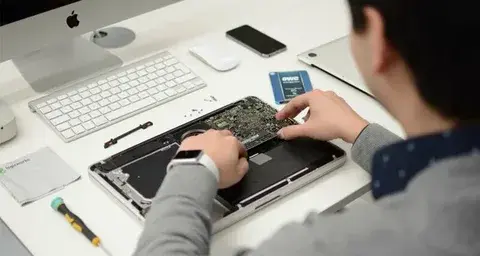
Carefully disassemble the device to access the logic board. Once removed, inspect it visually for:
Corrosion (white or green residue)
Burnt components
Water stains
A microscope is often used at this stage for detailed inspection.
2. Cleaning the Logic Board
Cleaning is one of the most important stages in liquid damaged repair.
Manual Cleaning:
Use isopropyl alcohol and a soft brush to gently remove corrosion and residue.
Ultrasonic Cleaning:
For deeper cleaning, place the logic board in an ultrasonic cleaner filled with a specialized solution. This helps remove contaminants from hard-to-reach areas.
After cleaning, allow the board to dry completely before proceeding.
3. Drying and Moisture Removal
Even after cleaning, moisture can remain trapped under chips. Proper drying methods include:
Air drying for several hours
Using a low-temperature drying chamber
Placing the board in a moisture-free environment
Skipping this step can undo the entire logic board repair process.
4. Testing for Faults
Once dry, the board is tested using diagnostic tools:
Multimeter for voltage checks
Power supply units to detect short circuits
Thermal cameras to identify overheating components
This stage helps pinpoint exactly which components need repair or replacement.
5. Component-Level Repair
If faulty components are identified, technicians perform micro-soldering to repair or replace them. Common repairs include:
Replacing capacitors or resistors
Fixing damaged ICs
Repairing broken traces
This is where advanced logic board repair skills come into play, as precision is critical.
Trackpad Repair After Water Damage
Water damage doesn’t just affect the logic board—it often impacts input components like the trackpad.
Common Trackpad Issues:
Unresponsive touch
Erratic cursor movement
Click failure
Trackpad Repair Methods:
Cleaning connector pins with isopropyl alcohol
Replacing damaged flex cables
Installing a new trackpad module if necessary
In many cases, trackpad repair is performed alongside liquid damaged repair to restore full device functionality.
Preventing Corrosion After Repair
Even after successful logic board repair, preventing future corrosion is essential.
Tips:
Apply protective coatings to exposed areas
Store devices in dry environments
Avoid using devices in humid conditions
Taking these precautions ensures long-term reliability after restoration.
Common Mistakes to Avoid
When dealing with water damage, certain mistakes can worsen the situation:
Turning the device on too soon
Using rice as a drying method (ineffective for internal moisture)
Skipping proper cleaning steps
Attempting repair without proper tools
Avoiding these errors increases the success rate of both logic board repair and liquid damaged repair.
When to Seek Professional Help
While basic cleaning can be done at home, advanced repairs require professional expertise. Consider expert assistance if:
The device shows no power
There is visible corrosion on chips
Multiple components are affected
Micro-soldering is needed
Professionals have the equipment and experience to handle complex logic board repair tasks safely.
Cost vs Replacement Consideration
One of the biggest advantages of liquid damaged repair is cost savings. Replacing an entire device can be expensive, whereas repairing the logic board often restores functionality at a lower cost.
However, if the damage is extensive, replacement might be the more practical option. A proper diagnosis helps determine the best course of action.
Final Thoughts
Water damage can seem like the end of a device’s life, but with the right approach, recovery is often possible. From careful cleaning to advanced component replacement, logic board repair plays a vital role in restoring functionality.
Combining these methods with effective trackpad repair and thorough liquid damaged repair techniques ensures a complete restoration process. Whether you’re a technician or a device owner, understanding these methods can help you make informed decisions and extend the life of your electronics.
Comments